Skip to content
Back to Prompts

Kids' Crayon Travel Journal Illustrator

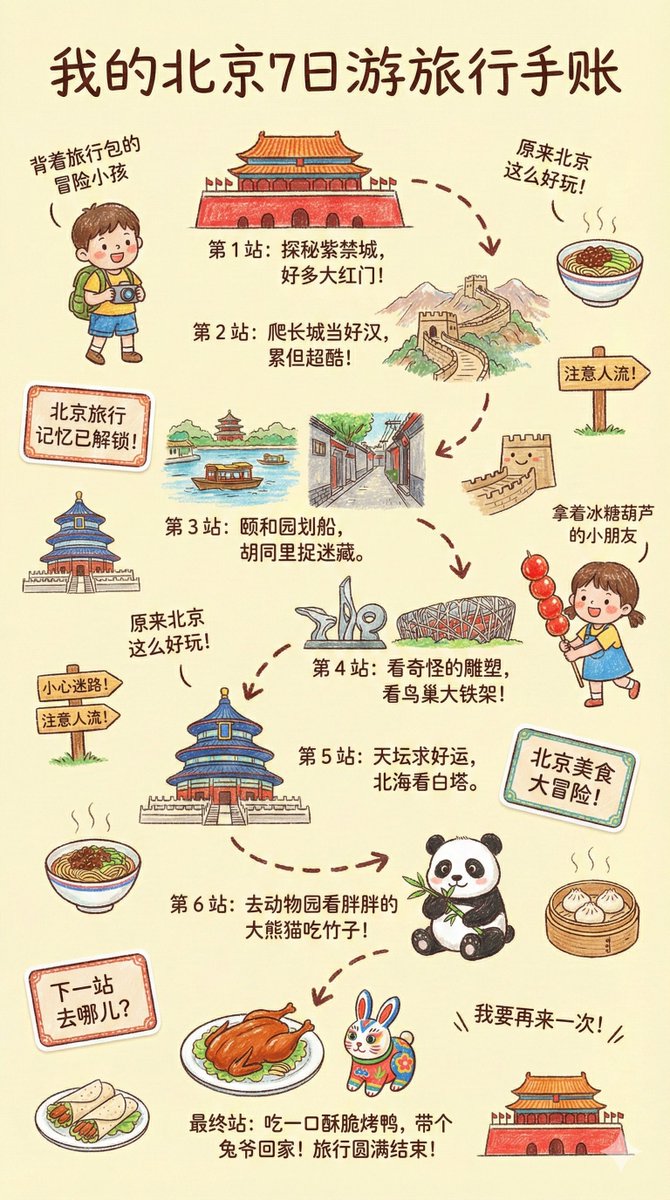
Generate a childlike travel journal illustration for a city
Image
Prompt
--- Prompt --- Please create a vibrant, child-like crayon-style vertical (9:16) illustration titled "{City Name} Travel Journal." The artwork should look as if it were drawn by a curious child using colorful crayons, featuring a soft, warm light-toned background (such as pale yellow), combined with bright reds, blues, greens, and other cheerful colors to create a cozy, playful travel atmosphere. I. Main Scene: Travel-Journal Style Route Map In the center of the illustration, draw a "winding, zigzagging travel route" with arrows and dotted lines connecting multiple locations. The route should automatically generate recommended attractions based on {Number of Days}: Example structure (auto-filled with {City Name}-related content): - "Stop 1: {Attraction 1 + short fun description}" - "Stop 2: {Attraction 2 + short fun description}" - "Stop 3: {Attraction 3 + short fun description}" - … - "Final Stop: {Local signature food or souvenir + warm closing remark}" Rules: - If no number of days is provided, default to a 1-day highlight itinerary. II. Surrounding Playful Elements (Auto-adapt to the City) Add many cute doodles and child-like decorative elements around the route, such as: 1. Adorable travel characters - A child holding a local snack - A little adventurer with a backpack 2. Q-style hand-drawn iconic landmarks - "{City Landmark 1}" - "{City Landmark 2}" - "{City Landmark 3}" 3. Funny signboards - "Don't get lost!" - "Crowds ahead!" - "Yummy food this way!" (Auto-adjust contextually for the city) 4. Sticker-style short phrases - "{City Name} travel memories unlocked!" - "{City Name} food adventure!" - "Where to next?" 5. Cute icons of local foods - "{Local Food 1}" - "{Local Food 2}" - "{Local Food 3}" 6. Childlike exclamations - "I didn't know {City Name} was so fun!" - "I want to come again!" III. Overall Art Style Requirements - Crayon / children's hand-drawn travel diary style - Bright, warm, colorful palette - Cozy but full and lively composition - Emphasize the joy of exploring - All text should be in a cute handwritten font - Make the entire page feel like a young child's fun travel-journal entry

How to Use This Prompt

  1. Copy the full prompt text with the copy button above.
  2. Replace any [bracketed] placeholders with your own subject, scene, or details.
  3. Paste it into Gemini / Nano Banana Pro — or hit "Try this Prompt" above to generate here for free — then tweak the wording against the example images.

Style Notes

Cinematic
Film-style rendering — widescreen framing, dramatic lighting contrast, graded colors (often teal-orange), and a sense of narrative in the scene.
Cute & Playful
Rounded shapes, big eyes, candy palettes, and toy-like proportions — the visual language of mascots and sticker packs.
Illustration
Hand-drawn or digital-painting aesthetics — visible strokes, stylized shapes and colors, deliberately not photoreal.
Logo / Icon
Symbol-first design — simple geometry that survives being scaled down, flat color, strong silhouette. Expect to vectorize the output before real use.
Portrait Orientation
Vertical aspect ratio (e.g. 3:4, 9:16) — the native format for phone screens, Stories, and app store screenshots.
Vibrant Colors
High saturation and bold color blocking — eye-catching in feeds, but pair with simple composition to avoid visual noise.

FAQ

How do I use this prompt with Gemini (Nano Banana Pro)?

Copy the full prompt with the copy button above, paste it into Gemini or any Nano Banana Pro-powered tool, and compare your result with the example images on this page. You can also click "Try this Prompt" to generate directly on this site — free daily generations, no sign-up needed.

Can I customize "Kids' Crayon Travel Journal Illustrator"?

Yes. Anything in [brackets] is a placeholder meant to be replaced with your own subject or details, and you can freely adjust subject, lighting, or style keywords — small wording changes often produce noticeably different results.

Which AI models does this prompt work with?

It was originally shared for Google's Gemini image models (including Nano Banana Pro). Most text-to-image models will understand it too, though composition and text rendering quality vary by model.
Related Prompts