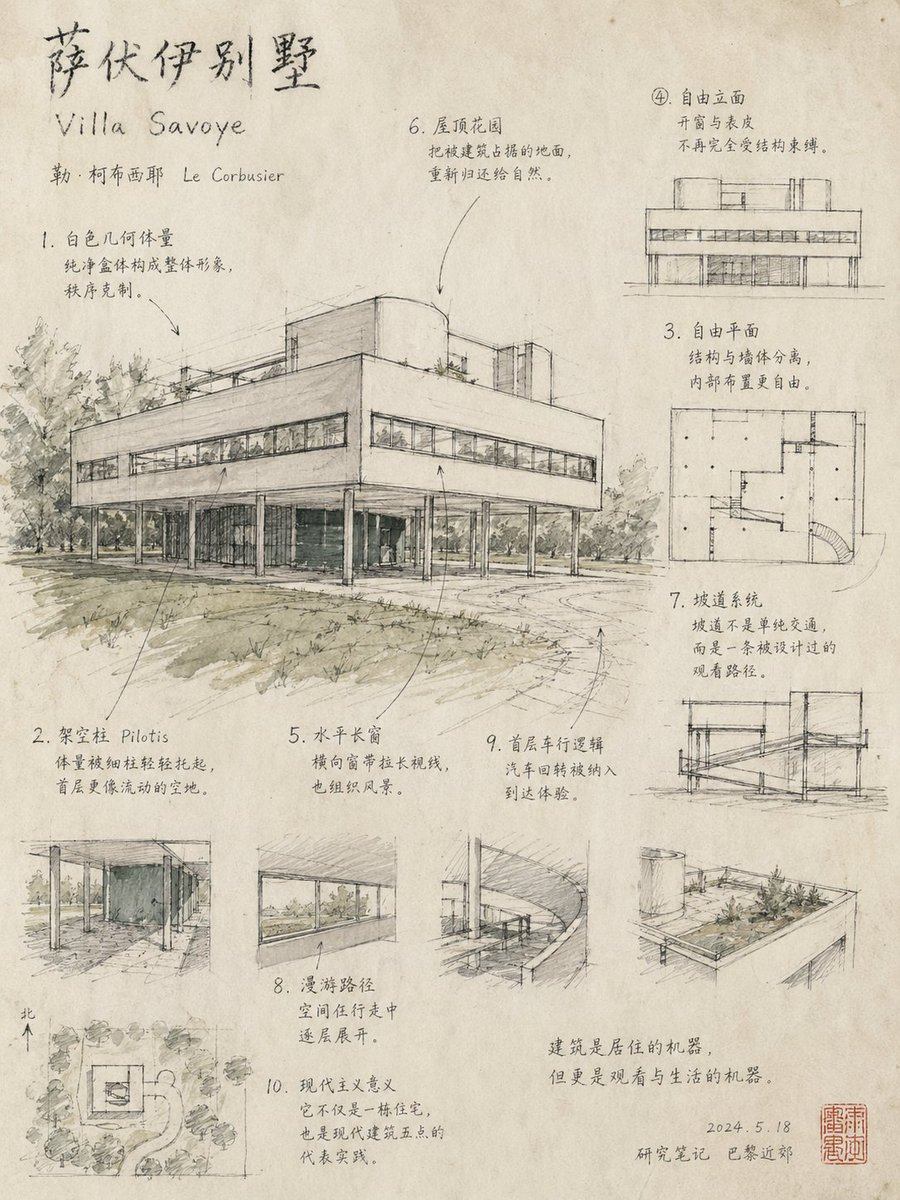
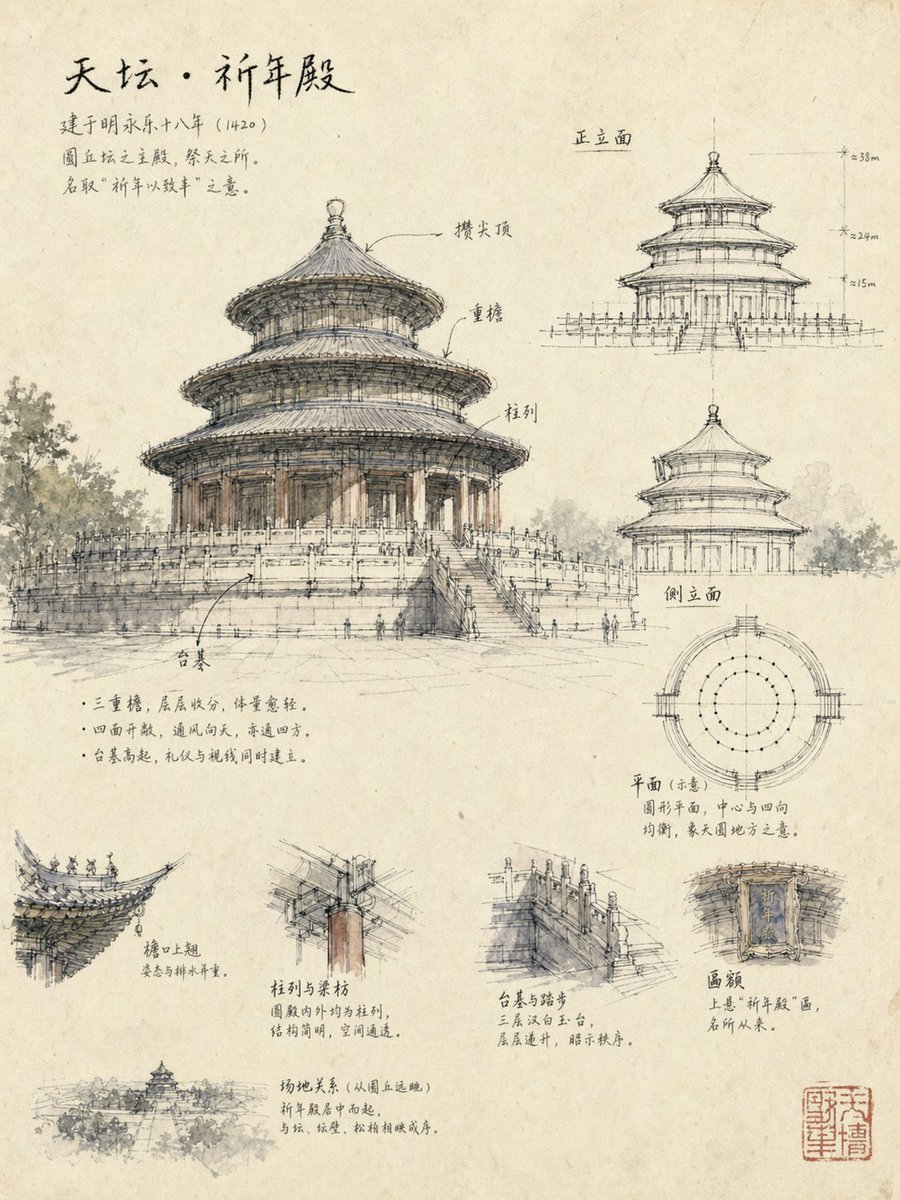
Generates a hand-drawn architectural study page in a loose, restrained, and generalized sketch style, focusing on a specific building like the Temple of Heaven, with analytical notes and diagrams.
Create an "Architect's Hand-Drawn Study Page / Architectural Sketch Knowledge Map," focusing on a single building, [Temple of Heaven]. The aspect ratio should be [3:4]. The number of knowledge points should be [10]. The overall image must convey a **very relaxed, restrained, and highly generalized architect's manuscript feel**, rather than a highly finished architectural restoration drawing, a detailed illustration, a rendering, a blueprint, a tourist promotional image, or a modern infographic overloaded with content.
## I. Core Vibe
The entire image must immediately convey:
- This is a **research sketch manuscript** left by an architect observing, analyzing, and recording on paper.
- It's not about "drawing completely," but "drawing the essentials."
- It's not about "explaining the building exhaustively," but "using professional judgment to capture the most noteworthy parts."
- It has knowledge, but expressed in a very light, loose, and handmade way.
- It has a strong paper texture, unfinished feel, sense of breath, and ample negative space.
Prioritize the following feelings:
- Loose, hand-drawn lines
- Slightly imprecise, tentative, double lines, broken lines
- High generalization rather than realism
- Selective depiction, rather than drawing everything clearly
- Architectural sketch-style observation
- Quiet, refined, restrained, academic, poetic
---
## II. Style Requirements (Very Important)
### 1. Line Style
Must be **architectural sketch lines**, not illustration lines:
- Lines are free, relaxed, light, restrained.
- Allows for tentative lines, double lines, broken lines, slight crookedness.
- Do not draw all edges solid, do not close all components.
- Only slightly strengthen key contours, key turns, key stress points.
- The image should clearly show the feeling of "observing while drawing."
### 2. Detail Control
This is the most crucial point:
- **Do not draw the building too specific, too concrete, too complete.**
- Do not meticulously depict tiles, beams, railings, carvings one by one.
- Do not resemble architectural restoration drawings.
- Do not resemble high-definition ancient building illustrations.
- Do not resemble neat technical drawings.
- Do not over-precisely represent structures.
- There should be many "stop-at-nothing" places.
- Details should be **selectively present**: only emphasize a few parts that best reflect the building's characteristics.
In other words:
**Better to be a little less, a little vague, a little generalized, than too solid, too full, too specific.**
### 3. Material and Paper Feel
The image must have a clear paper texture:
- Slightly yellowed drafting paper / handmade sketch paper / old research drawing paper.
- Paper fiber texture, slight old feel, natural mottled texture.
- Ink lines, pencil lines, mixed with extremely faint watercolor washes.
- Colors are very restrained, close to "barely colored."
- Only extremely light ochre, light gray, faint ink, subtle brown, extremely faint gray-green, and other low-saturation colors should appear.
- Coloring is only used to suggest volume, material, and atmosphere, not for complete coverage.
### 4. Completion Control
The entire image must look like:
- A page from an architect's research process.
- A high-quality analysis page from a sketchbook.
- Has content, but is not deliberately made into a "perfect finished product."
- Has many reservations, negative space, and unfinished traces.
Deliberately avoid:
- Over-completion
- Over-depth
- Over-explanation
- Over-neatness
- Over-decoration
- Over-realism
---
## III. Layout Logic
The entire image is a "hand-drawn architectural study page," but it must be more research-oriented than a regular illustration; at the same time, it should not be as densely packed as a strict infographic.
It is recommended to adopt the following layout, but the overall feel should be natural and relaxed:
- Left or center: one largest main perspective sketch.
- Right: 2-3 very light auxiliary analysis diagrams (e.g., front elevation, side elevation, plan).
- Bottom: 2-4 small detail sketches.
- Corner: 1 very small site relationship diagram or distant view diagram.
- Interspersed with a few handwritten annotations, arrows, leader lines, circles.
- Ample negative space is essential.
- Each module should appear to have been gradually added to the same sheet of paper, rather than mechanically pre-arranged.
---
## IV. Main Drawing Requirements
The main subject must be the largest architectural perspective sketch, but please note:
### The main drawing is not a complete restoration drawing, but a "generalized observational sketch."
Requirements:
- Clearly capture the building's most representative contours.
- Capture core features such as roofs, eaves, column arrays, platforms, and open relationships.
- The main drawing lines are the richest, but still loose.
- Cannot be drawn as a realistic diagram where "every detail is clearly explained."
- Parts can be slightly vague, slightly omitted, slightly broken.
- The environment can only be lightly hinted at, such as trees, slopes, rocks, paths, background tree shadows, used to set the building's location and atmosphere.
- Do not let the environment steal the show.
The main drawing should convey:
- The overall spirit of the architecture.
- The beauty of its contours.
- Volume relationships.
- Sense of spatial openness.
- Relationship between architecture and nature.
---
## V. Auxiliary Analysis Diagram Requirements
Can include the following content, but all must be drawn very lightly, faintly, and generally:
1. Front elevation diagram
2. Side elevation diagram
3. Plan diagram
4. If necessary, a very simple structural diagram
These auxiliary diagrams must note:
- They are "hand-drawn analysis diagrams," not CAD.
- Only retain necessary contours and a slight sense of dimensions.
- Can have a very small number of dimension lines, elevation marks, axis hints.
- But must be light, not too many numbers.
- Do not let these analysis diagrams overshadow the main subject.
- They are only to aid understanding, not strict construction drawings.
---
## VI. Detail Sketch Requirements
2-4 small detail sketches can be broken out below, but must maintain a sketch-like feel and not be overly detailed.
Suggested detail content:
- Eaves / Wing corners
- Column and beam relationships
- Railings / Platforms / Steps
- Plaque / Caisson ceiling / Roof turns (choose one)
Each detail requires:
- Focus on one key point, do not draw everything.
- A little light color is sufficient for local areas.
- A brief handwritten explanation, 1-2 sentences are enough.
- Stop at the essential, do not write long technical descriptions.
---
## VII. Method of Knowledge Explanation
This is a "knowledge-based hand-drawn diagram," but the knowledge expression must be like an architect's casual observation notes, not textbook typesetting.
Knowledge content should revolve around the following dimensions for "light explanation":
- Contours and forms
- Roofs and flying eaves
- Spatial openness
- Relationships between columns, beams, and platforms
- Site and sightlines
- Origin of name and cultural significance
But please note:
- **Do not explain too much.**
- Each module only explains the most critical one or two points.
- Language is concise, clear, natural.
- More like "research notes" than a "formal manual."
Example temperament should be similar to:
- "Double eaves receding in layers make the volume lighter."
- "Open on all four sides, making the pavilion more suitable for lingering and viewing."
- "The platform rises slightly, both preventing dampness and subtly elevating the sightline."
- "Flying eaves curve upwards, combining drainage with aesthetic posture."
Do not write like an encyclopedia, do not pile up too many professional terms.
---
## VIII. Text and Annotation System
Text must resemble an architect's notes on a drawing:
- Chinese handwritten feel.
- Slightly scholarly.
- Natural, loose, restrained.
- No modern font poster feel.
- Not overly neat and uniform.
Suggested text hierarchy:
- Main title: Building name (strong handwritten feel).
- Subtitles: Module titles (brief).
- Body text: 1-3 lines per block, short.
- Local labels: Component names, structural terms.
General principle for annotations:
- Just enough.
- Less is more.
- Has information, but not dense or full.
- Serves understanding, not to fill the canvas.
Can include:
- Arrows
- Leader lines
- Circles
- Light red stamp
- Small numbers
---
## IX. Visual Tendencies to Strongly Emphasize
Please strongly emphasize the following tendencies:
- Sketch feel
- Unfinished feel
- Judgmental generalization
- Paper texture
- Research feel
- Architect's manuscript feel
- Breath in lines
- Negative space
- Light, elegant, relaxed
---
## X. Error Tendencies to Strictly Avoid
Strictly avoid the following problems:
- Drawing too solid
- Drawing too full
- Drawing too much like a finished piece
- Drawing too much like an ancient building restoration illustration
- Drawing too much like a neat architectural drawing
- Drawing too many specific components
- Over-detailing
- Over-rendering
- Over-coloring
- Overloading with information
- Too many annotations leading to a cluttered layout
- Too much like a modern infographic
- Too much like a cultural and creative poster
- Too much like a tourist promotional page
- Too much like a high-completion commercial illustration
Please remember:
**This is not about "drawing the building clearly," but "extracting the spirit and key structure of the building in an architect's sketch style."**
---
## XI. Final Visual Goal
The final image should look like:
- A page from a high-quality architectural sketch research book.
- An observational research manuscript completed by an architect on-site or at their desk.
- Both knowledgeable and relaxed.
- Both analytical and restrained.
- Both beautiful and not overly decorative.
- Makes people feel "professional, natural, skilled at drawing, knowledgeable about architecture," rather than "drawn very full and laboriously."